Poly Studio R30 Honest Review — Is the Hype Justified?
I've been using the Poly Studio R30 as my primary video bar for home office meetings and small conference-room calls for several months. I bought it because I wanted a single device that would improve both my video and audio without the clutter of multiple peripherals. In this review I'm sharing what I actually experienced day to day: the things I appreciated, the annoyances that crept up over time, how it performs across Zoom/Teams/Meet, and whether the "hype" around it translates into real, practical value.
Introduction
When I first unboxed the R30, I appreciated the compact, polished look — it feels like a premium piece of office hardware. Poly markets these video bars as easy, smart, and built for modern hybrid work. After several months of continuous use (daily meetings, a few longer presentations, and several multi-person calls in a small meeting room), I have a clearer picture of what it's actually like to own one: the strengths that genuinely improve meetings and the limitations you'll notice if you rely on it as the centerpiece of a larger meeting room setup.
Design and Build
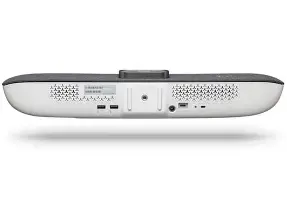
In my experience, the Studio R30 is well made. The chassis is compact and unobtrusive, and it looks nicer on top of my monitor than a clunky webcam. The matte finish resists fingerprints, which is nice because I tend to adjust equipment often. There's a felt-like rubber pad on the bottom that keeps it from sliding when I nudge cables, and a detachable bracket for wall or display mounting that felt solid once installed.
One thing I noticed was that the mounting hardware assumes a certain degree of neatness in your desk/display setup — cable routing around my monitor had to be adjusted to avoid pinching the USB-C cable. The remote and touch controls are minimal, which I liked for daily use, but I do wish there were a few more physical shortcuts for quickly toggling camera framing modes.
Setup and Compatibility
Setup was refreshingly simple. I plugged the R30 into my laptop using USB-C (it also works over USB-A with an adapter) and macOS and Windows both recognized it as a camera and speaker/microphone without driver installs. For most of my calls it was true plug-and-play: select the R30 in Zoom or Teams and you're live.
I also went through the Poly Lens setup and created an account so I could update firmware and tweak camera/audio settings. In my experience, Lens is helpful — especially for adjusting color balance, brightness, and microphone sensitivity from my phone — but it's another account and app to manage. If you want a device that "just works" with no cloud dependencies, you can avoid Lens, but you'll miss finer controls and firmware delivery convenience.
Camera Quality and Video Performance
The R30 produces a clean, natural image that made a noticeable difference over typical built-in laptop webcams. What I found was better-than-average color reproduction and skin tones that looked true-to-life without oversaturation. In daytime light and with a decent backlight, the image looks sharp and professional.
Low-light performance is competent but not miraculous. During late-evening calls, the R30 brightens the image and keeps noise under control, but you'll see softness and less detail compared with a larger dedicated camera and lighting. I was surprised by how well the auto-exposure handled quick changes (like when someone stood up during a call), though there were occasional moments where the automatic adjustments felt slightly slow and introduced a little transient flicker while settling.
Poly’s auto-framing and speaker-tracking features are useful in small groups. In my typical 3–6 person huddle, it kept everyone in frame and gently adjusted when someone leaned forward. On the downside, the framing can be a touch overzealous: when someone moves quickly toward the table, the crop sometimes snaps too tightly and then corrects, which is mildly distracting in the middle of a fast-paced discussion.
Audio — Microphones and Speakers
Audio is where the R30 shines for small rooms. The microphone array picked up everyone around my conference table clearly up to about 12 feet total distance in my tests; I could walk a couple of meters away and still be heard without raising my voice. The automatic noise suppression made background office noises — keyboard clacks and HVAC hum — less intrusive than with my laptop mic.
That said, the speakers are good enough for voice but not for rich media. In my experience, voices sounded natural and intelligible, but music or videos lacked bass and fullness. If you plan to use the R30 for mixed media (presentations with embedded audio or video playback for the room), you’ll notice thinness in the low end. I eventually supplemented with a small Bluetooth speaker for playback-heavy sessions.
Looking for the best Electronics deals on Amazon?
Shop Amazon →Also, on a few calls I noticed mild echo when multiple remote participants were loud and the meeting room's acoustics were poor. Poly’s echo-cancellation generally works, but it's not magical — room acoustics still matter.
Software Features and Updates
Poly Lens is the control plane, and after a few firmware updates I appreciated how the R30 gained small improvements over time (camera tuning, stability fixes). I used Lens to customize default framing, set LED behavior for privacy, and monitor health. The device also integrates nicely with major conferencing clients; I used it daily with Zoom and Microsoft Teams and saw good compatibility.
One annoyance: firmware updates sometimes required device restarts during business hours. Lens schedules updates, but if you forget to change the update window, you can get interrupted mid-day. Also, I ran into a couple of edge-case drivers/hot-plug issues on Windows where the device needed a reconnect to be recognized after sleep — not a dealbreaker but something I encountered twice.
Day-to-Day Use: Meetings, Presentations, and Streaming
For one-on-one meetings, the R30's camera makes a real difference: colleagues commented that video "looked better." For small team huddles the mic array and auto-framing made it easy to focus on discussion rather than setup. When I gave presentations that included a shared deck and embedded video, I found the video playback in the room lacking because of speaker limitations, so I relied on shared audio and instructed remote users to use their own playback if fidelity mattered.
I also used the R30 as a streaming camera for a few webinars. The image looked professional for live streams, and the USB connection to my streaming software was rock-solid once configured. However, for heavy video production I still prefer a dedicated camera and external audio gear — the R30 is optimized for meetings rather than studio-grade streaming.
Reliability and Long-Term Observations
After months of use, the R30 has been reliable overall. Reboots and updates were occasional hiccups but not frequent. What I noticed over time is that small behavioral quirks become more visible: the auto-framing preferences that felt fine at first later started to annoy me in fast meetings, and the lack of deep EQ on the onboard speakers means frequent switching to an external speaker if richer sound is needed.
On the plus side, the device's build quality has held up and the software updates improved stability. If you want a "set it and forget it" SMB/remote-work device for a small room, it largely delivers.
Pros & Cons
- Pros:
- Clean, natural video with good color reproduction for meetings
- Effective microphone pickup for small rooms — clear voice capture up to typical huddle distances
- Plug-and-play on macOS and Windows with broad conferencing compatibility
- Compact, tasteful design that blends into my desk or display mount
- Poly Lens support for remote firmware and fine-tuning
- Cons:
- Speakers are adequate for voice but lack bass and richness for multimedia playback
- Auto-framing can be overaggressive and occasionally distracting in dynamic meetings
- No deep hardware shortcuts — I missed fast physical controls for framing modes
- Firmware updates can be disruptive if scheduler windows aren't managed
- Not ideal as a standalone solution for medium/large rooms — best for small groups
Product Comparison
To help put the R30 in context, here's a short comparison based on my hands-on experience with similar small-room video bars.
| Feature | Poly Studio R30 (my experience) | Logitech Rally Bar Mini (my experience) | Jabra PanaCast 50 (my experience) |
|---|---|---|---|
| Camera Quality | Natural colors, good auto-framing for small groups; occasional over-crop | Very sharp, slightly wider field of view; generally more neutral processing | Excellent wide-angle stitching for panoramic rooms; can look processed |
| Microphones | Great for huddle rooms (clear to ~12ft); reliable noise reduction | Strong pickup with excellent beamforming for medium rooms | Good pickup, particularly for wider tables; works well with reverberant rooms |
| Speakers | Clear for voice, lacks low end for multimedia | Stronger speaker system — better for mixed media use | Balanced for speech, acceptable for light media playback |
| Ease of Setup | Very easy — plug-and-play; Lens optional | Also simple; robust management via Logitech Sync | Plug-and-play; management via Jabra Direct/Lift |
| Best For | Home office and small huddle rooms focused on meetings | Small-to-medium rooms and organizations needing more integrated hardware | Rooms needing wide-angle coverage and flexible mounting |
Buying Guide — What to Consider Before You Buy
I've learned a few practical things after using the R30 that I wish I'd known before purchase. If you're considering the R30, here are the key factors to weigh against your needs.
1. Room Size and Use Case
If your room typically hosts 2–6 people, the R30 fits perfectly. I used it in a small meeting room and at a home office desk. If you're equipping a medium room or need to cover multiple seating zones, you should consider a higher-end bar with stronger mics or additional mics/speakers.
Find top-rated Electronics products at great prices.
Browse Now →2. Audio Priorities
Decide whether voice clarity or media playback is more important. I prioritized voice and found the R30 excellent. If you plan to play videos or music in-room frequently, plan to add an external speaker or choose a video bar with more robust loudspeakers.
3. Integration and Management
If centralized device management is needed (for IT teams), check whether your organization uses Poly Lens or needs integration with other management platforms. Lens is useful, but it requires account setup and periodic management.
4. Privacy and Controls
Think about how you want to control camera privacy and default behavior. The R30 has physical privacy features and LED indicators; however, you'll want to confirm the default LED and mute behavior aligns with your privacy expectations.
5. Budget vs Value
Price matters. The R30 sits in a mid-to-premium range for single-device solutions. For me, the investment paid off because of the reduction in fiddly setups and clearer meetings. If you’re on a tight budget and only need a webcam for solo calls, a less expensive webcam may suffice.
6. Software and Firmware Updates
Plan for maintenance. If you manage multiple devices, allocate time for firmware windows so updates don’t interrupt important meetings. I found scheduling updates during off-hours eliminated surprises.
Final Thoughts and Conclusion
After several months with the Poly Studio R30, I feel comfortable saying the hype is mostly justified — provided what you need is a compact, dependable video bar for small rooms and home offices. What I appreciated most was the improved video quality over laptop webcams and the clear, reliable mic pickup for huddles. Those everyday improvements made meetings feel more professional and less tiring.
What bothered me were the compromises that come with a single, compact device: speaker output that’s fine for voices but lacking for media, and auto-framing behavior that occasionally felt intrusive. If those are dealbreakers for your workflow, consider a system with separate audio components or a bar with stronger speakers.
In my experience, if you want a clean, low-fuss upgrade to your meeting setup — especially for small groups — the R30 is a strong contender. If you need heavy multimedia playback or are equipping a larger room, plan to pair it with external audio or look higher up the product ladder. Overall, it struck a balance between image quality, voice capture, and ease of use that made it worth owning for my daily remote-work needs.