Rival 500 Honest Review — Is the Hype Justified?
I still remember the day I unboxed the Rival 500. As someone who spends far too much time in the world of MMOs and MOBAs, I have always been on a quest for the "perfect" mouse—that elusive piece of hardware that balances an absurd number of buttons with a layout that doesn't make my thumb feel like it’s trying to play a game of Twister. When I first heard about the Rival 500, the marketing buzz was all about "natural hand movement" and a revolutionary side-button layout. After using it as my daily driver for over six months, I’ve moved past the honeymoon phase and into the gritty reality of what it’s like to live with this mouse. I’ve lived through the software updates, the misclicks, the clutch plays, and the late-night grinding sessions, and I’m ready to share if the hype is actually justified.
The First Impression: A Radical Departure
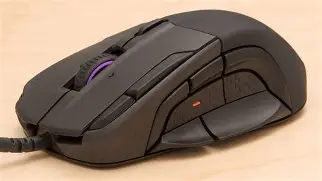
When I first plugged it in, the thing that struck me immediately was the shape. It is a chunky mouse. Compared to the sleek, slim profiles of FPS-centric mice I’ve used in the past, the Rival 500 felt like a significant piece of machinery under my palm. I have medium-to-large hands, and I tend to use a palm grip during long sessions, so the extra width was actually a welcome change. What I noticed that first afternoon was how my thumb sat naturally in the center of the side-button array. Unlike the popular "telephone pad" style found on many MMO mice—where you have twelve identical square buttons crammed together—the Rival 500 uses a circular layout of flick switches and buttons surrounding your thumb.
I was skeptical at first. I wondered if I would be able to distinguish between the buttons in the heat of a complex rotation. But in my experience, the tactile differentiation is actually where this mouse shines. After about a week of testing for muscle memory, I found that I wasn't searching for buttons anymore. I was flicking my thumb up or down or pressing forward with a distinct sense of where I was. It felt less like I was pressing a keyboard on a mouse and more like the mouse was an extension of my hand’s natural dexterity.
Detailed Analysis: The Layout and the "Flick" Switches
The standout feature for me was the two bottom thumb buttons. SteelSeries calls them "flick" switches. Instead of pressing them "in" toward the sensor, you flick your thumb downward. In my daily use, I mapped these to my most critical emergency abilities—my health potions and my main defensive cooldown. What I found was that flicking down is a faster physical motion than pressing in. When I was panicking in a raid or a high-stakes team fight, that downward flick felt instinctive. Even after months of use, I haven't seen any degradation in the spring tension of these switches, which was a concern I had initially.
However, one thing that bothered me during the first month was the placement of the top buttons next to the primary left and right clicks. There are three additional buttons flanking the main mouse buttons. While the one on the left (usually mapped to CPI toggle) is easy to reach with my index finger, the two on the right side required a bit of a finger stretch that I never quite got used to. I eventually stopped mapping critical combat commands to those right-side buttons because I found that reaching for them occasionally caused my middle finger to lift off the right-click entirely, which can be disastrous in a MOBA when you're trying to kite an opponent.
Tactile Alerts: Innovation or Gimmick?
I have to talk about the tactile alerts, because that was one of the biggest hyped features. The mouse essentially has a tiny motor inside that can vibrate or "pulse" based on in-game events. I was surprised by how much I actually liked this, though maybe not for the reasons SteelSeries intended. I didn't care much for it vibrating when I got a kill, but I found it incredibly useful for cooldown tracking. I set it up so that when my "Ultimate" ability was off cooldown, the mouse would give a short, sharp double-pulse. In the middle of a chaotic fight where I wasn't looking at my action bars, that physical sensation in my palm was a game-changer. It’s subtle enough that it doesn't throw off your aim, but distinct enough that you can't miss it. That said, the list of games that natively support GameSense is still smaller than I’d like, so I ended up having to manually create timers for many of my favorite titles.
The Daily Grind: Comfort and Build Quality
One thing I noticed after about four months of heavy use was the rubber side grips. This is often a weak point for gaming mice, where the glue starts to fail or the rubber wears smooth. On the Rival 500, the grip has held up surprisingly well. The texture is still there, and I haven't experienced any "peeling." However, the matte finish on the top shell is a bit of a fingerprint magnet. I find myself wiping it down at least once a week because the oils from my hand leave visible shiny patches. It doesn't affect the performance, but for a premium-feeling device, it can look a bit messy if you don't stay on top of the cleaning.
The weight is another factor that users should be aware of. This is not a lightweight mouse. If you are coming from a 60g ultralight mouse designed for flick shots in Counter-Strike, the Rival 500 is going to feel like a brick. At over 120 grams, you feel the inertia when you move it. For me, as someone who plays at a relatively low DPI and makes large sweeping movements, I actually appreciated the stability. It felt planted. But after a six-hour gaming marathon, I did notice a bit more wrist fatigue than I had with my previous, lighter mouse. It’s a trade-off: you get the buttons and the ergonomic support, but you pay for it in mass.
Shop the latest Electronics picks on Amazon.
View Offers →The Comparison: Rival 500 vs. The Traditional MMO Grid
I've spent years using the traditional 12-button side grid found on many competitors. The biggest issue I always had was the "button mush" factor. When you have twelve identical buttons, the middle row (5, 8, 11) is notoriously hard to distinguish. In contrast, the Rival 500's layout feels much more deliberate. I’ve put together a table below to help visualize how it stacks up against that traditional design based on my personal testing.
| Feature | Rival 500 (Alternative Layout) | Traditional 12-Button Grid |
|---|---|---|
| Thumb Muscle Memory | High: Distinct shapes and "flick" motions make identification easy. | Low: Often requires "homing" on specific buttons or feeling for bumps. |
| Button Reach | Variable: Bottom and side buttons are great; top-right buttons are a stretch. | Consistent: All buttons are in one block, but the back row can be hard to thumb-flex to. |
| Weight and Feel | Heavy and Wide: Best for palm or relaxed claw grips. | Moderate: Usually narrower, allowing for a tighter grip but more thumb tension. |
| Accidental Clicks | Low: The thumb rest area is clear, and flicking down requires intentional force. | High: Very easy to accidentally squeeze the side and trigger a button while lifting. |
| Software Integration | Advanced: Tactile alerts add a unique layer of feedback. | Standard: Mostly focused on macros and RGB lighting. |
Pros and Cons: My Honest Findings
After testing for several months, here are the specific things that stood out to me—both the good and the disappointing.
- The Ergonomics: I've been using this for months without any significant hand cramping. The way it flares out at the bottom supports the pinky and ring finger better than most mice I've owned.
- The Flick Switches: This is the "killer feature." The downward flick movement is so much more natural than squeezing your thumb inward. I wish every mouse had these.
- Tactile Feedback: Being able to "feel" my cooldowns changed how I play. It helped me stay focused on the center of the screen rather than glancing at my UI.
- Build Quality: The clicks feel crisp (no double-clicking issues yet!), and the scroll wheel has a very satisfying, tactile notch that isn't too loud.
- Software Flexibility: The Engine software is actually quite intuitive. Setting up complex macros and vibratory patterns was surprisingly straightforward.
- Disappointment - Top Side Buttons: Those buttons to the right of the main click are almost useless for me. My hand just isn't shaped in a way that makes them easy to use without compromising my grip.
- Disappointment - Weight: It's heavy. If you play games that require verticality or very fast lift-offs, you will feel the strain after a while.
- Disappointment - Aesthetics: While functional, it’s a bit of an "ugly duckling." It looks a little bulbous and utilitarian compared to the sleek aesthetic of modern gaming gear.
Buying Guide: Is It Right for You?
Before you decide to pick this up, you really need to evaluate your playstyle. In my experience, this mouse is a specialist tool. If you mostly play FPS games where aim and speed are everything, I honestly think you should look elsewhere. The weight alone will hold you back. However, if your gaming library consists of World of Warcraft, Final Fantasy XIV, League of Legends, or even complex strategy games like Stellaris, the story changes.
What I found was that the Rival 500 is for the player who wants more control without the clutter. If you’ve tried the 12-button mice and found them overwhelming or difficult to use without looking, this is the logical next step. It’s also a great choice for productivity. I’ve actually mapped several Photoshop and Premiere Pro shortcuts to the flick switches, and it has genuinely sped up my workflow. When you're buying, consider your grip style. This mouse is tailor-made for palm-grip players. If you use a "fingertip" grip where only your tips touch the mouse, you’re going to struggle to reach half the buttons.
One specific thing a real owner would notice: pay attention to your thumb size. If you have very small thumbs, the "circle" of buttons might feel a bit wide, and you might find yourself having to "reach" for the forward and back buttons more than you'd like. For those with medium-to-large hands, it feels like it was custom-molded.
Detailed Performance: The Sensor and Clicks
During my testing, I wanted to see if the optical sensor could keep up with high-intensity movements. While it’s marketed as a MOBA/MMO mouse, I did run it through some rounds of fast-paced shooters just to see. What I found was that the tracking is flawless. There’s no hardware acceleration or smoothing that I could detect. Even when I slammed the mouse down after a large swipe, the sensor didn't spin out. It’s remarkably reliable.
The main left and right clicks have a rated lifespan that seems legitimate. After roughly half a year of clicking—and let’s be honest, in MOBAs, that’s a lot of clicks—the tension remains identical to day one. I haven't noticed any "mushiness" or that annoying pre-travel that develops on cheaper mice. This suggests that the internal switches are high quality and well-enclosed against dust and debris.
Refining the Experience: The Physical Lock
One small but brilliant detail I appreciated is the physical switch on the bottom of the mouse that allows you to lock the two bottom flick switches. If you find that you're accidentally triggering them when lifting the mouse or during intense movements, you can effectively turn them into a solid thumb rest. I used this for the first few days while I was getting used to the shape, and then unlocked them once I felt confident in my control. It shows that the designers were thinking about the learning curve that comes with such a radical layout change.
Shop the latest Electronics picks on Amazon.
View Offers →The Software Ecosystem
A mouse like this is only as good as the software that controls it. Throughout my months of use, the SteelSeries Engine has been remarkably stable. I’ve had issues with other brands where the software would "forget" my profiles or fail to load on startup, but I haven't experienced that here. The ability to link profiles to specific executables works perfectly. The moment I launch my favorite MMO, the mouse pulses once to let me know the profile has switched, and all my custom macros are ready to go. The macro editor itself is robust, allowing for delay recording and "press-and-hold" functions that are essential for high-level play.
One thing I would have liked to see is a bit more integrated "cloud" support for those who use multiple computers. Having to manually export and import my complex tactile alert settings when I moved to my laptop was a bit of a chore. It's a small gripe, but in 2026, we expect a bit more seamlessness between devices.
The Verdict: Is the Hype Justified?
After several months of daily use, I can confidently answer the question: is the hype justified? I would say a resounding "yes," but with a very specific asterisk. The Rival 500 isn't a mouse for everyone. It doesn't try to be a "jack of all trades." It is an unashamedly specialized piece of hardware designed for people who need a lot of inputs and want them to feel distinct and ergonomic.
The "flick" switches and the circular thumb layout are not just marketing gimmicks; they are genuine improvements over the cluttered 12-button grids of the past. The tactile alerts, while requiring some setup, provide a level of immersion and utility that I now find hard to live without. However, the sheer weight and the awkward placement of the top-right buttons mean that it’s not quite a perfect 10/10.
In my experience, if you are tired of the "phone pad" mouse design and want something that feels more like a natural extension of your hand, the Rival 500 is arguably the best option on the market. It’s a bold, weird, and incredibly functional tool that has earned its spot on my desk. It took a leap of faith to switch to this layout, but after months of play, I can’t imagine going back to a standard mouse for my gaming sessions. If you’re a palm-grip player looking for a competitive edge in your favorite ability-heavy games, the Rival 500 is a fantastic investment that lives up to its promises.
Conclusion
The Rival 500 is a rare example of a company taking a real risk with ergonomics and actually succeeding. It challenged my expectations of what a mouse "should" look like and replaced them with a design that prioritizes how my thumb actually moves. While it has its quirks—namely the weight and a couple of hard-to-reach buttons—the core experience is solid, reliable, and deeply satisfying. After using it for over half a year, I'm not just keeping it; I’m recommending it to every MMO player I know. It’s an honest, high-performance tool that focuses on the details that matter during a long gaming session, and for that, it certainly justifies the hype.